
Cole's Neighborhoods tool has been shut down. Bresser's has your replacement — Call (800) 995-0570 to get started today
  Home Service Prospecting

Neighborhood Targeting
for Home Service Businesses.

Map any job site. Filter homes by age, value, and square footage. Pull new mover lists within 45 days of closing. Get phone numbers and emails built in — searches always unlimited.

Unlimited Searches Map-Based Territory Tools New Movers Within 45 Days Est. 1946
Unlimited Searches Radius · Polygon · Freehand Map Search New Movers — 45-Day Refresh Phone & Email Included Filter by Home Age, Value & Sq. Ft. Family-Owned Since 1946
Cole Neighborhoods Replacement

Cole's Neighborhoods Tool Is Gone. Here's What's Better.

Cole shut down its Neighborhoods product when the platform was discontinued. If you relied on it to find homeowners in your service areas, Haines Property Connect is the full replacement — with map search, property characteristic filters, 45-day new mover files, and built-in phone and email contact data. You can be prospecting your territory today.

Without a Replacement
  • No way to identify neighbors of your current job sites
  • Can't filter by home age, value, or square footage
  • Missing the new mover window — your highest-intent prospect
  • Calling random cold lists with no geographic focus
  • Competitors who moved fast are already owning your territory
  • Paying $150–$228 per lead through Google Ads to fill the gap
With Haines Property Connect
  • Map any job site — radius, polygon, or freehand draw
  • Filter homes by age, value, square footage, and type
  • New mover file refreshed within 45 days of closing
  • Phone and email built in — multi-channel ready from day one
  • Unlimited searches — browse and filter without burning your plan
  • A fraction of the cost of paid lead generation platforms
Simple Process

Three Steps. Then You're Prospecting.

Log in, map your territory, filter for the right homes, export. That's it. No data cleaning, no reformatting, no separate vendor for phone and mail.

1

Map Your Territory

Draw a radius around any job site, sketch a polygon around a subdivision, or use freehand draw to follow any boundary that matters to your business. The platform shows every homeowner record inside that boundary instantly. No ZIP code compromise — you search the exact geography where you work.

2

Filter for Your Best Prospects

Narrow your map results by home age, estimated value, square footage, and property type. A roofer targets homes over 15 years old. An HVAC company filters for larger square footage. A fertilizer company wants lots above a certain size. Filter to exactly the homes your service is built for before you export a single record.

3

Export Your List and Go

Pull homeowner names, mailing addresses, phone numbers, and email addresses in one export. Load it into your CRM, dialer, or hand it to your door-to-door team. Searches are unlimited — only exports count against your monthly plan. Refine as many times as you need before pulling a single record.

The difference from generic list tools: You're not pulling names from a ZIP code boundary someone else drew. You're identifying the specific homes that match what your service requires — and targeting the neighbors of your existing customers while your truck is still visible on that street.
Simple, Transparent Pricing

Plans for Every Volume — Searches Always Unlimited

Choose based on how many records you export each month. All plans include the full platform — map search, property filters, new movers, phone, and email. Annual plans save significantly over the regular rate.

Try It Monthly First

$119/month — 1,000 exports, full platform, one state. No annual commitment to get started.

  Get Started
Core
$895/yr
Reg. $1,195/yr
2,500 exports/mo1 State
Get Started
Essential
$1,395/yr
Reg. $1,895/yr
3,500 exports/mo1 State
Get Started
Elite
$4,495/yr
Reg. $5,995/yr
30,000 exports/mo1 State
Get Started
Every plan includes: Unlimited searches · Radius, polygon & freehand map search · New mover file (45-day refresh) · Property detail reports (year built, sq. ft., estimated value) · Phone numbers & email addresses · Custom list builder · Absentee owner targeting · Current & historical mortgage records · FEMA flood zone preview · Dedicated Customer Success team

Not sure which plan fits your monthly export volume? Call 800-995-0570 — we'll match you to the right tier in one conversation.
Search Tools

Search the Way Your Business Actually Works.

Home service contractors don't think in ZIP codes — they think in job sites, service corridors, and routes. The map tools in Property Connect are built for exactly that kind of geographic logic.

Radius Search

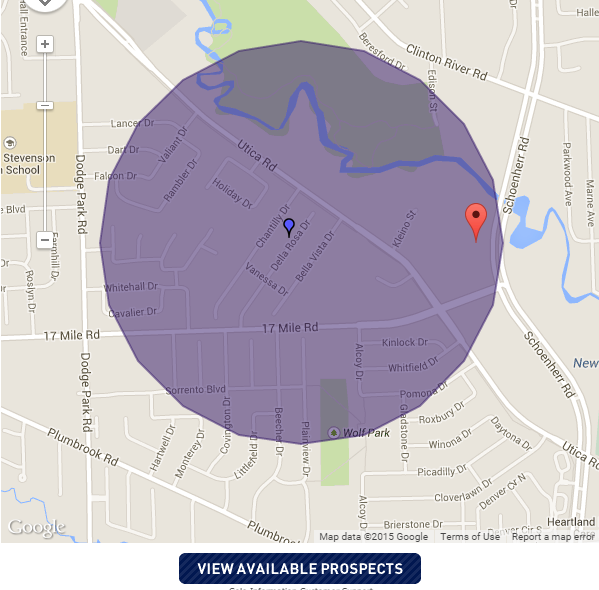
Drop a pin on any address — a current job site, a customer's home, your shop — and set a mile radius. Every homeowner record inside that circle is available to search, filter, and export. The most natural way to prospect "while we're in the area."

Polygon Search

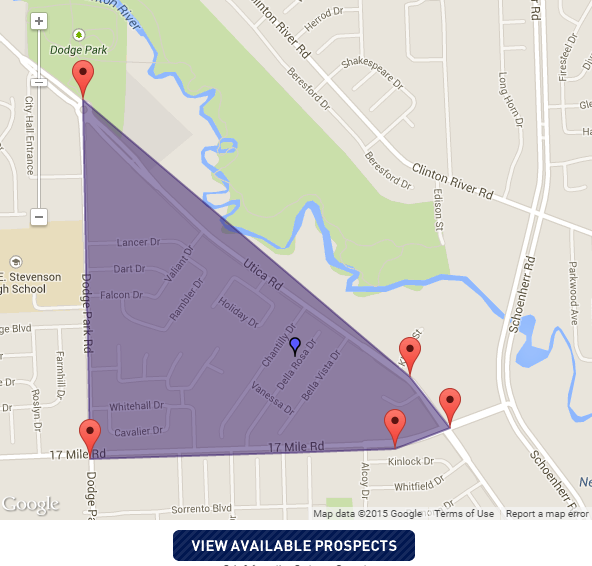
Click-to-draw a custom polygon around any territory — a subdivision, a cluster of streets, a specific development. Follow the geography your business actually serves, not an arbitrary ZIP code boundary that cuts your market in half.

Freehand Draw

Sketch any shape directly on the map. Useful when your service territory follows a natural boundary — a highway, a river, a school district line, or a county road — that doesn't map to standard geographic selects.

Property Characteristic Filters

Layer filters on top of any map search: home age (year built), estimated value, square footage, property type, and sales history. Narrow 10,000 homes to the 400 that actually match your service criteria before you export a single record.

Phone & Email Built In

Landlines, cell phones, and email addresses are included in every annual plan where available. One export delivers your full multi-channel outreach list — direct mail, phone, text, and digital — without a separate append service.

Custom List Builder

Build, save, and export targeted lists from any combination of map search and filters. Name your lists, export them in standard formats, and load them directly into your CRM, dialer, or direct mail workflow.

Strategy

Digital Door Knocking: The Strategy Behind the Data

The fastest-growing home service companies in 2025 turned every completed job into a multi-touch outreach campaign targeting the neighbors of that installation. They call it digital door knocking — and Property Connect is the data layer that makes it work at scale.

The Neighbor Outreach Sequence

1

Job Completes — Map the Neighborhood

The moment a job closes, log in and run a radius search around the customer's address. Filter for homes matching your service criteria — age, size, value. You have a list of your next 50–200 prospects in under five minutes.

2

Week 1 — Direct Mail Piece

Mail a postcard or door hanger to every home on the list: "We just finished a [roof / HVAC install / landscaping job] for your neighbor at [address]. While we're in the area, we'd like to offer you a free inspection." The social proof is real and visible from the street.

3

Week 2 — Phone Outreach

Your list has phone numbers. Your team makes calls. The opening: "We just wrapped a project on your street and wanted to reach out while we're still in the area." Contact rates on neighborhood lists are significantly higher than cold geographic lists because the relevance is immediate.

4

Week 3–4 — Email Follow-Up

Email addresses are in the same export. A follow-up email with a photo of the completed job next door and a time-limited offer closes the sequence. Multi-touch from one list, one export, one platform.

Why Neighborhood Outreach Works

4.4%
Average direct mail response rate across all list types — vs. 0.12% for email and under 1% for digital display ads. (ANA/DMA Response Rate Report, 2025)
$0.33–$0.40
Approximate cost per exported record on Property Connect annual plans (plan price ÷ monthly export allocation) — vs. $19–$43 median cost per direct mail acquisition. (ANA, 2023)
1–2%
Conversion rates reported by home service companies running neighbor outreach campaigns after completed jobs — based on field operator data. Results vary by trade, market, and offer.
45 days
How fresh the new mover file stays — updated within 45 days of closing, so you reach new homeowners before they've chosen any of their service providers.
Industry Playbooks

How Each Trade Uses Neighborhood Targeting

Property Connect works differently for every trade — because the right prospect looks different for a roofer than for a pest control company. Here's how each industry applies the platform's filters and map tools to find their best prospects.

Roofing Companies

Prospect Lists for Roofers

Roofing is the most geographic of all home service trades. Storm events, aging neighborhoods, and completed installs all create cluster opportunities. Property Connect gives roofing companies three critical filters:

  • Filter by year built to target homes whose shingles are approaching or past their lifespan
  • Run radius searches around storm-affected areas immediately after a weather event
  • Map neighbors of every completed job while the install is still visible from the street
  • Export phone numbers for canvasser pre-qualification before door knocking

HVAC Contractors

Homeowner Lists for HVAC Companies

HVAC prospecting lives and dies on property age and square footage — both are filterable in Property Connect. Systems installed in the early 2000s are approaching end-of-life in most climates. Larger homes carry the highest replacement job value.

  • Filter for homes built 15–25 years ago — equipment approaching replacement age
  • Target higher square footage for larger-capacity system installs
  • Pull new mover lists for homeowners who haven't yet chosen a maintenance contractor
  • Seasonal campaigns: target aging-system homes before peak summer and winter demand

Landscaping & Irrigation

Prospect Lists for Landscapers

Landscapers build routes — and routes are built by neighborhood. Property Connect's map tools are purpose-built for route-based businesses that need to cluster their jobs geographically to eliminate drive time between properties.

  • Draw a polygon around your existing route to fill open slots in the same area
  • Filter by estimated home value to target homeowners who invest in landscaping
  • Target new movers who need a landscaper from scratch
  • Pull neighbors of current customers to expand a profitable route without adding miles

Fertilizer & Lawn Care

Lawn Care Homeowner Prospect Lists

Lawn care is one of the highest-repeat service categories in the trades — a customer acquired in March is billed monthly through October. That makes every neighbor of a current customer a high-value long-term prospect, not just a one-time job.

  • Target homes adjacent to current accounts to build geographic density on each route
  • Filter by property characteristics to find homes with larger lots requiring more service
  • Pull new mover lists — new homeowners need a lawn care program from day one
  • Export phone and email for spring and fall acquisition campaigns

Pest Control

Pest Control Neighborhood Marketing Lists

Pest pressure is a neighborhood phenomenon — when one home has an infestation, adjacent properties face the same risk. Pest control companies that can rapidly geo-target a neighborhood after a service call convert on a very compelling offer.

  • Map and contact neighbors of every treatment job — same pest pressure applies to the block
  • Pull new mover lists — new homeowners in unfamiliar territory consistently buy pest protection
  • Filter by property age — older construction has more entry points
  • Export phone and email for automated follow-up sequences

Remodeling & Home Improvement

Homeowner Lists for Remodelers

Remodeling prospects are homeowners who have stayed in a home long enough to want upgrades — and who have the home value and income to support them. Property Connect's property filters surface exactly those households.

  • Filter for higher estimated home value — homeowners more likely to invest in upgrades
  • Filter by home age — kitchens and baths in 20–30-year-old homes are prime remodel candidates
  • Map neighbors of completed renovation jobs — visible curb appeal drives neighborhood interest
  • Use square footage filters to target homes where the job size meets your minimum ticket

Windows & Siding

Window & Siding Replacement Prospect Lists

Windows and siding replacements cluster by neighborhood age — subdivisions built in the same era tend to have windows and siding approaching end-of-life at the same time. A single storm or energy-efficiency campaign can convert an entire block.

  • Filter by year built to target neighborhoods where original windows are aging out
  • Map neighbors of every install — a completed siding job is visible advertising
  • Combine home age and home value to find the sweet spot for replacement investment
  • Pull phone and email for multi-touch outreach sequences

Painting

Painting Contractor Prospect Lists

Interior and exterior painting jobs are among the most visible home improvements on any street. When a painting crew finishes a job, the curb appeal improvement is obvious to every neighbor — and that visibility converts.

  • Run radius searches around every completed exterior job
  • Filter by home age to target properties where exterior paint is likely due
  • Target new movers who frequently repaint before settling into a new home
  • Export for door hanger and postcard campaigns to saturate a profitable block

Solar

Solar Homeowner Prospect Lists

Solar canvassing in the right neighborhood is dramatically more efficient than cold-call campaigns. Property data lets solar companies pre-qualify homes before knocking — filtering out rentals, absentee owners, and low-value properties before the first door.

  • Use absentee owner targeting to exclude rental properties from solar campaigns
  • Filter for higher home value — homeowners more likely to finance a solar investment
  • Target neighbors of completed installs — visible panels drive neighbor curiosity and conversion
  • Pull new movers in states with strong solar incentives
Don't see your trade above? If your business grows by working the same neighborhoods where you're already doing jobs — Property Connect works for you. Call 800-995-0570 and we'll walk through how the platform fits your specific prospecting model.
New Mover Targeting

New Movers: Your Highest-Intent Home Service Prospect

A homeowner who closed 30 days ago hasn't chosen their lawn service, pest control company, HVAC contractor, or landscaper yet. They are actively evaluating every provider on their street — and the first business to reach them professionally has a decisive advantage.

45-Day Refresh

The new mover file in Property Connect is updated within 45 days of closing. That keeps your list current with the homeowners actively outfitting a new home — before your competitors have reached them.

Active Buying Mode

New movers make more home-related purchase decisions in the first 90 days than in any comparable period afterward. Pest control, lawn care, HVAC setup, and painting are all first-year decisions in a new home.

No Established Competitor

Unlike approaching a long-term resident, a new mover has no existing relationship with a lawn care company or HVAC technician in the area. You're not trying to displace a competitor — you're filling a vacancy.

Geographically Precise

The new mover file works within any map search boundary. Draw your service territory and pull only new movers within that geography — no wasted records outside your service area.

The New Mover Outreach Window

The first 90 days after closing is the peak opportunity window for most home service trades. After that, homeowners begin to establish provider relationships and become harder to displace.

Day 0
Closing
Keys in hand. Provider relationships: none.
Day 1–45
Peak Window
In Property Connect's file. Every trade competing for a first impression.
Day 45–90
High Value
Still evaluating. Many providers not yet chosen.
Day 90+
Diminishing
Provider relationships forming. Harder to displace an incumbent.
Year 2+
Established
Existing providers entrenched. Referral is now primary path.
Full Platform Features

Everything in the Platform. No Nickel-and-Diming.

Every feature below is included in all annual plans. The property filters, the new mover file, the phone numbers, the email addresses — all of it is in the plan, not behind an add-on paywall.

Radius, Polygon & Freehand Map Search — target any service territory with the search shape that fits your business
New Mover File — updated within 45 days of closing for the freshest possible homeowner leads
Property Detail Reports — year built, sq. footage, sales history, tax records, and property characteristics
Estimated Home Value — filter by property value to target the homes that fit your service investment level
Phone Numbers — landline and cell phone data included where available on all annual plans
Email Addresses — included in all annual plans for multi-channel outreach
Custom List Builder — build, name, save, and export targeted lists from any map search and filter combination
Current & Historical Mortgage Info — loan amount, borrower, and lender on record
Absentee Owner Targeting — identify single-family and multi-unit properties with off-site ownership
FEMA Flood Zone Preview — identify properties within designated flood zones for relevant service targeting
Custom Comparable Reports — generate and export detailed property comparison reports
Branded Report Export — export and email reports with personalized branding
Unlimited Searches — browse and filter without counting against your plan; only exports count
Dedicated Customer Success Team — a real person assigned to your account, not a ticket queue
Why Bresser's

80 Years of Data. Zero Fluff.

Since 1946, Bresser's has supplied accurate prospect data and direct mail services to home service businesses across the country. We've seen platforms come and go — we're still here because we deliver.

A Dedicated Customer Success Contact

Property Connect includes a dedicated Customer Success team — not a help desk ticket, not a knowledge base article. A real person who knows your account and can walk you through search strategy, filter logic, and export questions in one call.

90+ Years of Property Data Behind the Platform

Haines & Company has maintained and refined property data since 1929. The coverage depth, update frequency, and data quality behind Property Connect reflects nearly a century of professional data management — not a startup's scraped database built last year.

One Vendor for Data and Direct Mail

Export your neighborhood list from Property Connect and hand it to Bresser's. We design, print, address, and deliver to USPS in-house — all from the same company that set up your subscription. No coordinating between a data house and a print shop. One call handles everything.

Unlimited Searches — No Metered Browsing

You can build, filter, and refine your territory searches as many times as you want without it counting against your plan. Spend your export allocation on records you're actually going to work — not on exploratory searches that turned out not to be the right fit.

You Own Your List

Unlike pay-per-lead platforms where competitors receive the same contact simultaneously, a Property Connect export is your list. You own it. Nobody else got the same record at the same time. Your neighbor outreach campaign isn't being countered by a competitor's identical outreach campaign.

600+ Active Clients. Real Track Record.

Haines Property Connect has over 600 active clients across real estate, insurance, and home services. This is not a platform trying to find product-market fit. It's a proven tool used by established businesses in competitive markets — and it's available to you today.

1946
Bresser's founded —
family-owned ever since
1929
Haines & Company
founded
600+
Active clients on
Property Connect
45
Days — new mover
file refresh cycle
Searches — unlimited
on every plan
Complete Solution

Need to Mail Your Neighborhood List?

Bresser's is a USPS-certified full-service Mail Service Provider. Export your list from Property Connect and hand it to us — we take it from there. One vendor handles your data and your mail. See also: Direct Mail Services · Every Door Direct Mail · Route Builder Lists

From Property Connect Export to Mailbox — One Call

Your neighborhood list goes directly into our production workflow. Every piece is addressed, sorted, and USPS-prepped in-house by our certified mail service team. You don't coordinate between vendors — you make one call.

  • Postcard printing & USPS-compliant direct mail design
  • Every Door Direct Mail (EDDM) for full carrier route saturation
  • USPS-certified full-service Mail Service Provider — compliance built in
  • Address verification & NCOA processing on every list
  • Informed Delivery integration — digital preview before the mailbox
  • Same family-owned company since 1946 — talk to a real person every call
Common Questions

Neighborhood Targeting for Home Service Businesses: FAQ

What is neighborhood targeting for home service businesses?
Neighborhood targeting means building a prospect list based on geography — the homes immediately around a current or completed job site, a specific subdivision, or any radius or boundary you define. For home service companies, the strategy is to reach neighbors while your crew is already visible on the street. The social proof of a neighbor watching your work — a finished roof, a freshly landscaped yard, a new HVAC unit on the pad — is one of the strongest conversion signals in the trades. Haines Property Connect is the data platform that lets you act on that visibility at scale.
What is a good Cole Neighborhoods replacement?
Haines Property Connect is the direct replacement for Cole's Neighborhoods tool. It provides geo-targeted homeowner prospecting with map-based search tools (radius, polygon, freehand draw), property characteristic filters (home age, value, square footage), a new mover file updated within 45 days of closing, and built-in phone and email contact data. Bresser's Marketing Solutions is an authorized reseller — call 800-995-0570 and we can have you set up and prospecting today.
How does the map search work?
Log into Property Connect and open the map search interface. You can drop a pin on any address and set a mile radius, click to draw a polygon around any territory, or sketch a freehand boundary that follows whatever geographic logic your business uses. The platform shows every homeowner record inside that boundary instantly. Apply property filters — home age, value, square footage, property type — to narrow to the records that match your service criteria. Searches are unlimited, so you can refine as many times as you need before exporting. Only exports count toward your monthly plan allocation.
What are new mover lists and why do home service companies use them?
A new mover list identifies homeowners who have recently purchased a property — in Property Connect, this file is updated within 45 days of closing. New movers are among the most valuable prospects in the home service trades because they haven't yet chosen providers for lawn care, pest control, HVAC maintenance, landscaping, or painting. They are actively evaluating every provider in their new area — and the first business to reach them professionally has a significant advantage. Unlike approaching an established homeowner where you're displacing an incumbent, reaching a new mover means filling a vacancy. There's no relationship to overcome.
Can I filter prospects by home age, square footage, or value?
Yes — Property Connect includes property detail filters for year built, square footage, estimated home value, and property type. You can apply any combination of these on top of any map search. A roofing company prospecting for homes over 15 years old gets a far more qualified list than one pulling every address in a ZIP code. An HVAC contractor filtering for larger square footage targets the homes with the highest-value system replacement potential. A remodeler filtering by home value and age finds properties where the owners are most likely to invest in upgrades. These filters are included in all annual plans at no additional charge.
What is digital door knocking and how does it apply to home service marketing?
Digital door knocking is the practice of using homeowner data to execute multi-channel outreach — direct mail, phone calls, email, and digital ads — to the neighbors of your current or recently completed jobs. The term mirrors traditional door-to-door canvassing but replaces physical knocking with coordinated outreach using verified contact data. The core sequence: complete a job, run a map search around the customer's address, export neighbor contacts with phone and email, then execute a direct mail piece, follow-up calls, and email sequence over two to four weeks. Home service companies using this approach report conversion rates of 1–2% on neighbor campaigns — at an outreach cost that is a fraction of what Google Local Services Ads charge per lead.
Are phone numbers and email addresses included in the platform?
Yes. Phone numbers (landline and cell) and email addresses are included in all Property Connect annual plans where available. You don't need a separate data append service — your export from Property Connect already includes the contact information needed for mail, phone outreach, and email campaigns. This is a meaningful difference from list providers that sell you addresses and then charge separately for phone and email appends as a second transaction.
What is the difference between searches and exports?
Searches in Property Connect are unlimited on all plans. You can browse, map, filter, and refine your territory as many times as you need without anything counting against your plan. Exports are when you download a list of records to use in your outreach — that's what counts toward your monthly plan allocation. The practical benefit: you can spend as much time as you need identifying the right territory and filtering it to the right homes, and only spend your export allocation on the records you're actually going to mail, call, or email.
How do I use Property Connect to target neighbors of my current customers?
After completing a job, log in and run a radius search around the customer's address — typically 0.25 to 1 mile depending on your trade and how dense the neighborhood is. Apply any relevant property filters (home age, value, square footage) to narrow the results to homes that match your service criteria. Export the list with phone and email addresses. Use the list to run a direct mail campaign, make follow-up calls, and send an email sequence positioning your company as the local provider that just finished a job around the corner. The social proof is real and immediately visible — and it's the warmest prospect pool your company can reach.
What makes Property Connect better than buying a generic homeowner mailing list?
A generic homeowner mailing list gives you addresses. Property Connect gives you a searchable, filterable platform where you control the geography, the property characteristics, and the recency of the data — and you can update and re-run your search next month without buying a new list. The map-based search tools let you prospect the exact territory your business serves, not a ZIP code boundary that includes half a market you don't want. The property filters let you qualify prospects before exporting. The new mover file gives you a segment that no static mailing list updates automatically. And searches are unlimited — you're paying for a platform, not per search.
How does Property Connect compare to paying for leads on HomeAdvisor or Google Local Services Ads?
The cost structure is fundamentally different. On HomeAdvisor, you pay per lead — typically $15–$60 — for a contact that is simultaneously sent to multiple competing contractors. On Google Local Services Ads, roofing and HVAC companies pay $100–$228 per lead in competitive markets. With Property Connect, you pay a flat annual subscription and export homeowner records for a fraction of a cent each — records you own exclusively, with full contact information, organized by your geographic criteria. The tradeoff: paid lead platforms deliver intent-driven contacts ready to hire; Property Connect requires you to do the outreach. But the economics at volume, and the fact that you own your list, make it a very different cost structure for companies willing to run their own campaigns.
Which plan is right for a small roofing or landscaping company?
For a small company running targeted neighborhood campaigns around job sites, the Core plan at $895/year (1,850 exports/month) or the Essential plan at $1,395/year (3,500 exports/month) are the most common starting points. If your business does more volume — multiple crews, active door-to-door canvassing with pre-call lists, or full ZIP code saturation campaigns — the Team plan at $3,595/year handles 15,000 exports per month. The best way to match a plan to your volume is a quick call: 800-995-0570.
Can Bresser's mail my neighborhood list for me?
Yes. Bresser's is a USPS-certified full-service Mail Service Provider. Export your list from Property Connect, hand it to us, and we design, print, address, and deliver your mailers to USPS — all in-house. No coordinating between a data house and a separate print shop. We've been managing mailings to USPS standards since 1946. We also handle Every Door Direct Mail (EDDM) campaigns if you want to blanket an entire carrier route without a specific address list. Call 800-995-0570 for a quote.
What is the best time of year to run neighborhood prospecting campaigns for my trade?
Timing depends on your trade. Lawn care and landscaping companies should run spring acquisition campaigns in March through May before homeowners lock in a provider. HVAC contractors get two windows — pre-summer (April–May) for cooling prep and pre-winter (September–October) for heating tune-ups. Roofing companies should have storm-event radius searches ready to run immediately after a weather event, and plan-replacement campaigns targeting older homes in late summer and fall. Pest control converts year-round but spikes in spring. Remodelers target homeowners planning projects in fall and winter for spring execution. The new mover file runs year-round — closing volume is high in spring and fall, which are also your highest-opportunity periods for new mover outreach.
How do I get started?
Call 800-995-0570 or fill out the form on this page. We'll walk you through which plan fits your monthly export needs, get your account set up, and introduce you to your dedicated Customer Success contact. Most subscribers are searching and exporting their first list the same day their account is activated. If you were previously using Cole's Neighborhoods, we can typically get you operational the same day you call.
Complete Guide

How to Prospect a Neighborhood: A Field Guide for Home Service Businesses

What We've Seen in 80 Years of Selling Neighborhood Data

We've been in this business since 1946. The pitch hasn't changed: your next customer is already living next to your last one. A crew finishing a roof on Maple Street, a fresh lawn treatment visible from the sidewalk, a new unit on the pad — every completed job is advertising to the neighbors who watched it happen. What's changed is the data layer. Property Connect gives you the ability to act on that visibility within minutes of a job closing, with a filtered list of the right homes, phone numbers included, ready to work. That's what we're selling.

How to Build a Neighbor Outreach Campaign Step by Step

  • Log the customer address at job completion — this becomes your map search center point
  • Run a radius search (0.25–1 mile depending on trade and neighborhood density)
  • Apply property filters appropriate to your service: home age, value, and square footage
  • Review the result set before exporting — adjust filters if the count is too high or too low
  • Export with phone and email included
  • Queue a direct mail piece within 48–72 hours of job completion — while the install is fresh and visible
  • Assign phone follow-ups 7–10 days after the mail drops
  • Send a follow-up email 14–21 days after initial outreach with a time-sensitive offer
  • Log results back to the export to build a conversion dataset for future territory planning

Why Property Age Filters Change the Math

Most companies mail a radius and hit everything. If you're a roofer and 60% of the homes in that radius have roofs installed in 2018, you've wasted 60% of your postage on homes that won't need you for another decade. Filtering to homes built before 2000 or 2005 cuts your list to the replacement window — without adding a dollar to the cost, because the filter is in the platform. Same budget. Better list. Better conversion.

New Movers: First Contact Wins

For recurring services — lawn care, pest control, HVAC maintenance — a new mover isn't a one-time job. They're a customer you keep for as long as they own the home. The window to get there first is 45 days. After that, someone else has it. Property Connect's new mover file refreshes within that window. Reach them with a real offer before any competitor has made contact, and you're not competing — you're filling a vacancy.

Route Density Matters More Than Volume

Twenty accounts on one street is more profitable than twenty accounts scattered across ten ZIP codes. Fuel, drive time, and technician efficiency all improve when your jobs cluster geographically. Property Connect's polygon and radius tools are built for exactly that — draw your current route, find the homeowners you don't have yet, and target them specifically. For canvassing teams, a pre-filtered address list (homes over 20 years old, above a value threshold, inside a drawn boundary) produces better contact-to-appointment ratios than an unfiltered cold list every time.

How to Load a Property Connect Export Into Your Workflow

Exports come in standard formats — CSV or Excel — and load directly into most CRMs, dialers, and direct mail platforms. The simplest pattern: export, import into your CRM as a campaign, assign phone and mail follow-ups to your team, log outcomes. After a few cycles you'll know which neighborhoods convert best for your trade and which property profiles to prioritize. The list gets smarter every time you use it.

Get Started

Ready to Own Your Neighborhood?

Tell us your service area and we'll walk you through the right plan. One call gets your account active.

Local: 313-874-0570  ·  670 W. Baltimore, Detroit MI 48202  ·  Family-Owned Since 1946

  Call 800-995-0570 to Get Started

Or fill out the form below — we'll contact you shortly.

Request Information — We'll Contact You Shortly

Fill out the form and a Bresser's team member will follow up with plan options for your trade and service area.